PLATFORMS / ENGINEERING & CONFIGURATION

Studio

Studio carries engineering context into configuration. Its SuperChart workbench connects the identity of a control object with the room, actuator and protocol information needed to implement it.

Concept artwork · Tecco
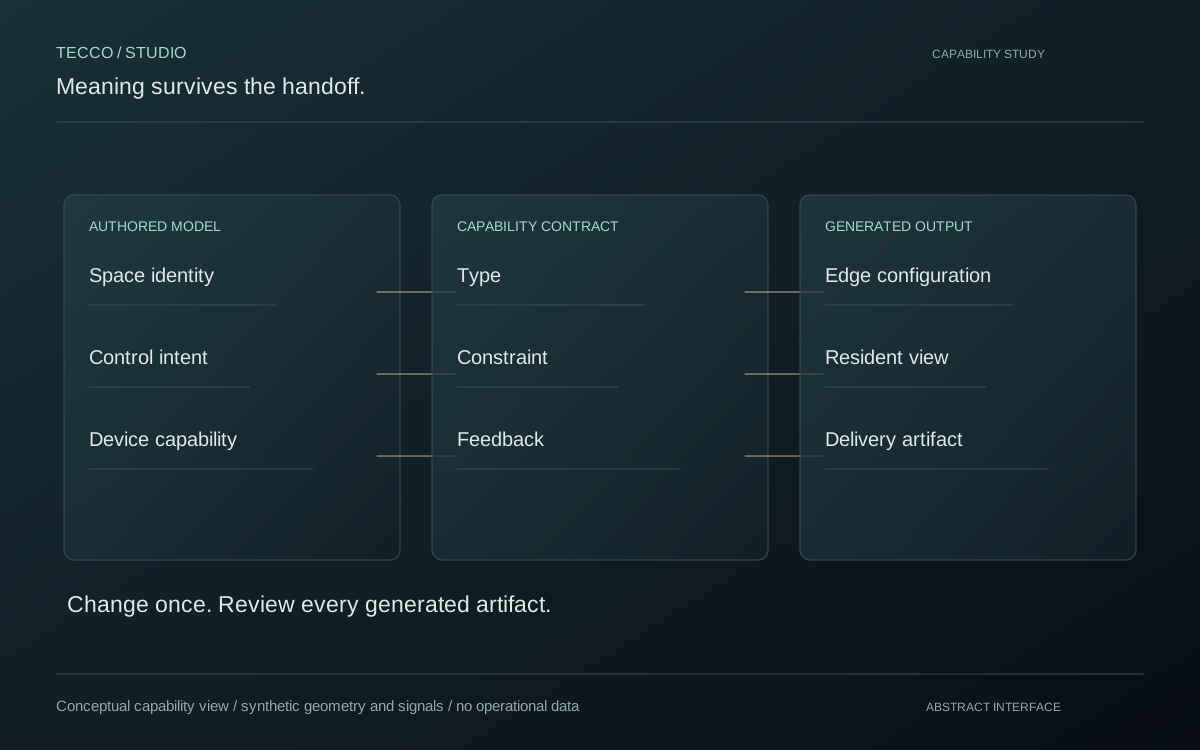
Abstract Studio capability study: authored meaning, contracts and generated outputs
Engineering workflow · authored meaning, contracts and configuration · conceptual diagram
CAPABILITY STUDIES

Understand the principle.
See what becomes possible.

Purpose-built abstract views explain each capability. These are conceptual representations, not production interfaces or operational data.

Identity survives the engineering handoff. Conceptual artwork for Preserve the room model through delivery.
Identity survives the engineering handoff.
01 / FEATURE EXPLORATION

Preserve the room model through delivery.

The activated room sheet keeps spatial names, floors and device counts together. It is a readable engineering handoff between the authored home and its installation.

Studio distinguishes activated deliverables from inactive files. The public exhibit represents the relationship between rooms and delivery artifacts without exposing project records.

Generated conceptual artwork · not a product interface


Every circuit belongs somewhere. Conceptual artwork for Give every circuit a place and purpose.
Every circuit belongs somewhere.
02 / FEATURE EXPLORATION

Give every circuit a place and purpose.

Device schedules connect an object name, control type, circuit and room. These explicit associations make a design inspectable before it becomes device configuration.

A circuit is more than an address: it belongs to a space and has a defined capability. Engineers can review those relationships in a structured schedule.

Generated conceptual artwork · not a product interface

Contracts give configuration its shape. Conceptual artwork for Carry engineering meaning into configuration.
Contracts give configuration its shape.
03 / FEATURE EXPLORATION

Carry engineering meaning into configuration.

The SuperChart workbench brings control objects and engineering fields beside the generated configuration representation. The selected view connects named objects with the local software configuration.

Version and draft states keep engineering changes visible. The abstract study shows the boundary between authored intent and generated outputs.

Generated conceptual artwork · not a product interface
SYSTEMS / IN DETAIL

From control object to executable configuration.

SuperChart brings spatial identity, actuator information, engineering bindings and semantics into one workbench. Control and feedback remain separate fields because successful transmission is not proof of a physical outcome.

ENGINEERING / FOLLOW THE FLOW
CONCEPTUAL MECHANISM 01 / 04
BoundaryResponsibilityEngineering consideration
Object identityStable meaning across consumersKeep the room and capability understandable before selecting a transport.
Control bindingA request to change a deviceValidate address and data type against the installed project.
Status bindingAn observation of device stateCheck whether feedback is fresh, available and independent of the command.

Why keep a generated preview?

Generation reduces repetitive translation, but it does not replace commissioning. A readable configuration preview lets engineers compare the authored object with its transport mapping. The captured workbench is a test configuration; its presence does not establish deployment or acceptance at an installed site.

HOW STUDIO FITS
01

Model the control object

A control object needs a room, stable identity and capability context. The authored project provides that shared meaning before transport-specific addresses are assigned.

02

Bind commands and observations separately

KNX control group addresses, status group addresses and data point types carry different responsibilities. Engineering configuration must retain that distinction so that a sent command is not confused with an observed state.

03

Generate and inspect

The workbench exposes KNX YAML preview, ETS export and version history. Generated configuration remains an engineering artefact to review against the installed project.

Inside the workbench

Other platforms

All platforms